
Blue Flame 3DA3 - App Store
You'll be able to see results in few seconds.
Publisher Description
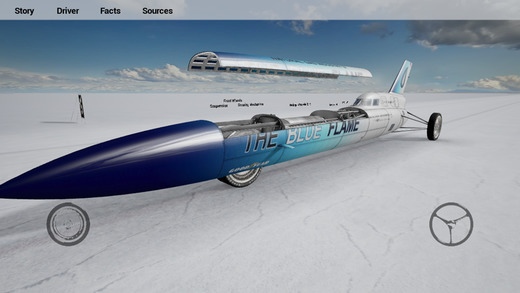
3DA take you back in time to October 23, 1970 to Bonneville Salt Flats in Utah where the rocket-powered vehicle Blue Flame driven by Gary Gabelich set a new World Land Speed Record which lasted for more than a decade and became the first car in the history to achieve 1000km/h.
Blue Flame 3DA offers you the stroll through the authentic scenery of amazing Bonneville Salt Flats, allows you to admire the beautiful exterior of the rocket car and lets you look under the hood. You can sit next to the Gary Gabelich and enjoy the ride directly from the cockpit or watch the land speed record run from different angles. Thats all in 3D with high res textures. For those interested more in this topic, read the story behind the Blue Flame, remind yourself some facts, explore the unique 3D model of the vehicle or have just fun by watching the cinematic experience of the race.
This app is dedicated to all who have the power to design their own dreams and live them.
Celebrate the 45th anniversary of this memorable event.
left joystick - move around
right joystick - look around
tap on the car - look under the hood
tap on the driver - start the ride
buttons with information
music
audio effects
3D model
authentic enviroment
cinematic experience
hyperlinks
Warning for iPhone 4,4S,iPad 1,2,Mini owners. This application is currently not fully function on these devices.
I'm terribly sorry, but I currently not able to do it. Still, I'm trying variations. Thank you for your patience.
This app is optimized for iPhone 5, iPhone 6, iPhone 6 Plus, iPad 3rd generation, iOS 7-8
Requires iOS 6.1 or later. Compatible with iPhone, iPad, and iPod touch.
About Blue Flame 3DA
The company that develops Blue Flame 3DA is Michal Barta. The latest version released by its developer is 3.
To install Blue Flame 3DA on your iOS device, just click the green Continue To App button above to start the installation process. The app is listed on our website since 2015-09-16 and was downloaded 0 times. We have already checked if the download link is safe, however for your own protection we recommend that you scan the downloaded app with your antivirus. Your antivirus may detect the Blue Flame 3DA as malware if the download link is broken.
How to install Blue Flame 3DA on your iOS device:
- Click on the Continue To App button on our website. This will redirect you to the App Store.
- Once the Blue Flame 3DA is shown in the iTunes listing of your iOS device, you can start its download and installation. Tap on the GET button to the right of the app to start downloading it.
- If you are not logged-in the iOS appstore app, you'll be prompted for your your Apple ID and/or password.
- After Blue Flame 3DA is downloaded, you'll see an INSTALL button to the right. Tap on it to start the actual installation of the iOS app.
- Once installation is finished you can tap on the OPEN button to start it. Its icon will also be added to your device home screen.
Program Details
System requirements
Download information
Pricing
Version History
version 3
posted on 2015-09-16
Disclaimer
Official App Store Link
We do not host Blue Flame 3DA on our servers. We did not scan it for viruses, adware, spyware or other type of malware. This app is hosted by Apple and passed their terms and conditions to be listed there. We recommend caution when installing it.
The App Store link for Blue Flame 3DA is provided to you by apps112.com without any warranties, representations or guarantees of any kind, so access it at your own risk.
If you have questions regarding this particular app contact the publisher directly. For questions about the functionalities of apps112.com contact us.
